
posted Fri, 09/13/2024 - 09:10
1484
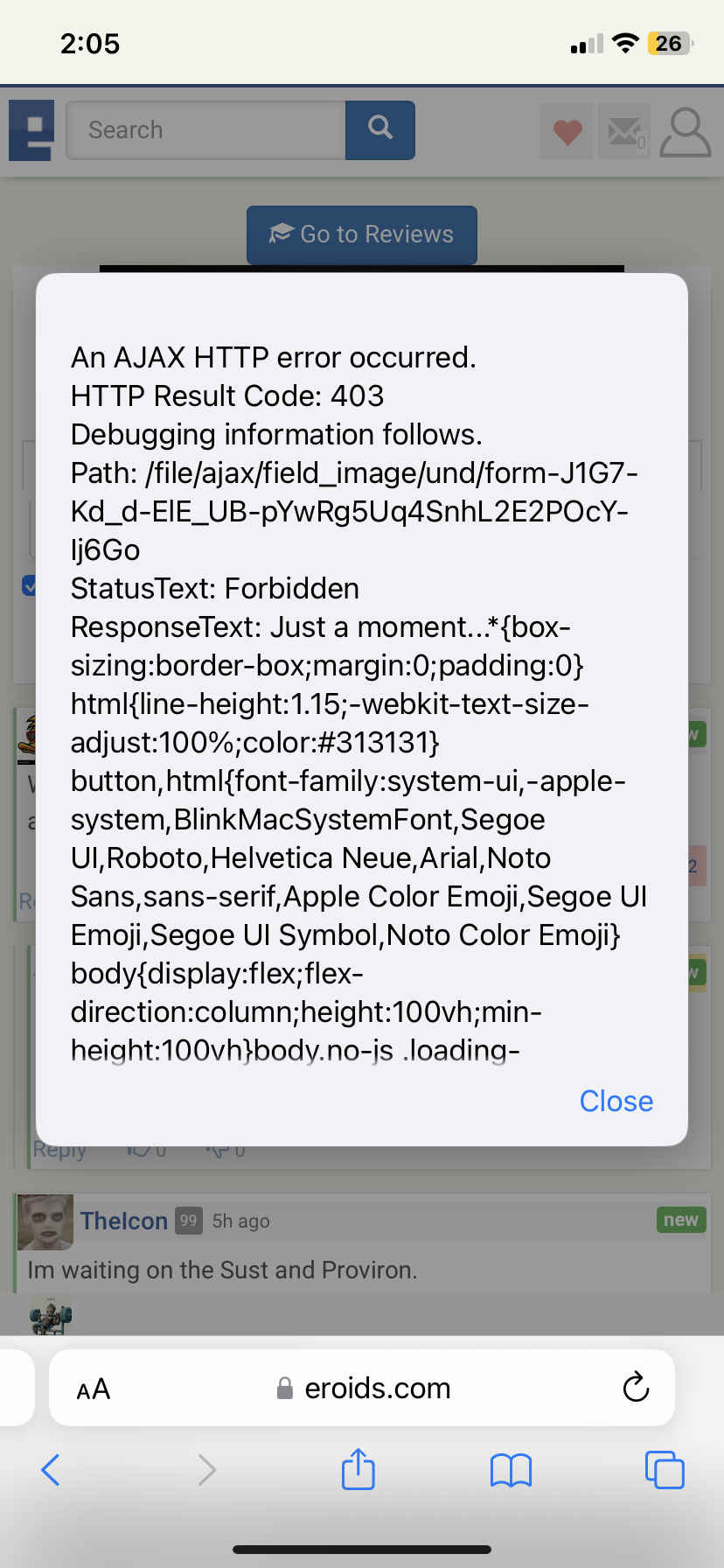
Why do I get this error when I try to upload pic on src discussion
ad
I can upload pics in submit pics, reviews but always get this error when trying to upload to a source discussion page
- Bookmark
- 0
- 0
@Swfl-239 @ChuckThaDuck22 @Pumped_ @Dixon_Credible
Try adding your image, but do not press the UPLOAD button, just save the comment. Let me know if that works so I can pinpoint the problem.
Put it this way, every other comment I have to copy and paste and reload my page , I just deal with it, it’s worth the hassle even if it’s kinda fucked,
Lesson in patience
Same error here too. Ajax result code 403
I'm on brave browser, pc version, tried with shields up and down, same error
Didn't work. Tried that. Same "an ajax http error occurred. Result code 403"
Has to be because of my private browser and duckduckgo
I dont use those and tried everything under the sun. Its not your duckgo
That’s what’s cooking good looking
@Swfl-239 @ChuckThaDuck22 @Pumped_ @Dixon_Credible I'm going to change the way comments are loaded in source disco pages for a day, please report if you notice any changes when uploading pics.
This happens when we get spammed by scrappers or ddos, which is a 3 times a week event lately.
I believe the spam/ddos protection system thinks you guys are from bad IPs and prevents you from uploading. I'm not sure why it doesn't clear the "flags" after a while.
I’m also running a very well known, highly rated VPN, can never be to careful.
I have VPN on my home network but not on my gyms it’s an open network .. but mostly I use my iPhone INCOGNITO for the forum and vendor sites
I like where your heads at.. I’m also using DuckDuckGo to get rid of trackers,
I can also hit the “fire” icon and delete all tabs and history if it ever gets to that point
Doesn't surprise me that you would even be using DuckDuckGo
Subliminally I must have been a duck in my past life,
Crazy also our Atlantic League baseball pro team over here on Long Island is the Long Island Ducks
Lmao. You got this duck thing down!
But now I'm able to post pics for first time in awhile now
I’m only able to some of the time,
If I had the ability to change my Eroids name I’d choose : TrannyHawk69
Nahh we're all stuck on this duck thing of yours. No changing anything.
You stuck like a duck for life
If the shoe fits wear it, even Mikey was like I know you as T**** but you’ll forever be chuck the duck
I don't remember you name. Does T stand for Tom lol?
lol well my old profile is TommyB916 so yeah that’s the real name, hopefully the Feds don’t come knocking on the door,
They’ll be in for a rude awakening
Do t just clear the cache but reset network settings on iPhone/android, not sure how to do it on pc as I don’t have one, however this resets everything back to default
You’ll have to type in the WiFi password again but everytime I have some sort of networking issue this clears it up, I use DuckDuckGo and this only happens if you stay on a comment screen long without sending the comment .
Im the facility director for 5 nursing homes tso kind of the defacto IT guy and ive done everything possible that i tell these nurses do when they get error messages and nothing fixes it. Used to work fine months ago and haven't changed anything
Who’s ran the error through CMD yet though?
Now you're talking Chinese lol. Just because the nurses think im IT dont make me IT
Just run the path through command prompt lol and it should show some things, I’d literally copy and paste that to the Microsoft forums and some geek would sort this out in a split second.
I don’t have a pc
I get the same. I cant even upload the screenshot to show @BFG. Its been like this for over a month. Tried chrome, explorer, firefox, cleared cache cleared cookies and history
Edit: tried the screenshot and crop and that wont work either
Probably the format or size, I’ve had it happen. Take a screenshot of the pic and trim it as needed, always works for me.
Same here